Stripe Integration for Business Central | Payment Gateway
Our Stripe integration with Dynamics 365 Business Central enables businesses to accept online payments, automate financial processes, and manage transactions directly within their ERP system. This fully integrated solution provides bi-directional synchronization between Stripe and Business Central, eliminating manual work, reducing errors, and improving financial visibility. It does not require any third-party connector or API. With our solution, master data such as customers and items/products can be created in either Business Central or Stripe. Our integration is secure, reliable, and designed for seamless business operations.
Features of Stripe Integration with Business Central
Bi-directional auto/manual synchronization between Microsoft Dynamics 365 Business Central and Stripe for customers, products, pricing, invoices, and charges.
Supports multiple Stripe Accounts for a single Business Central company.
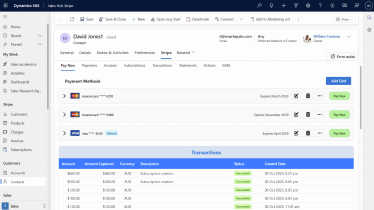
Modern Stripe Customer Dashboard
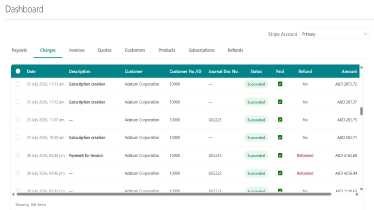
Modern Stripe Account Dashboard
Support multiple Stripe accounts in a single Business Central company
Pay directly from Stripe Hosted Invoice URL embedded in Microsoft Dynamics 365 Business Central Invoice.
Automated payment posting in Microsoft Dynamics 365 Business Central when payment is made with Stripe.
Payment through email Payment link.
Process Stripe batch charges for selected Invoices in Business Central.
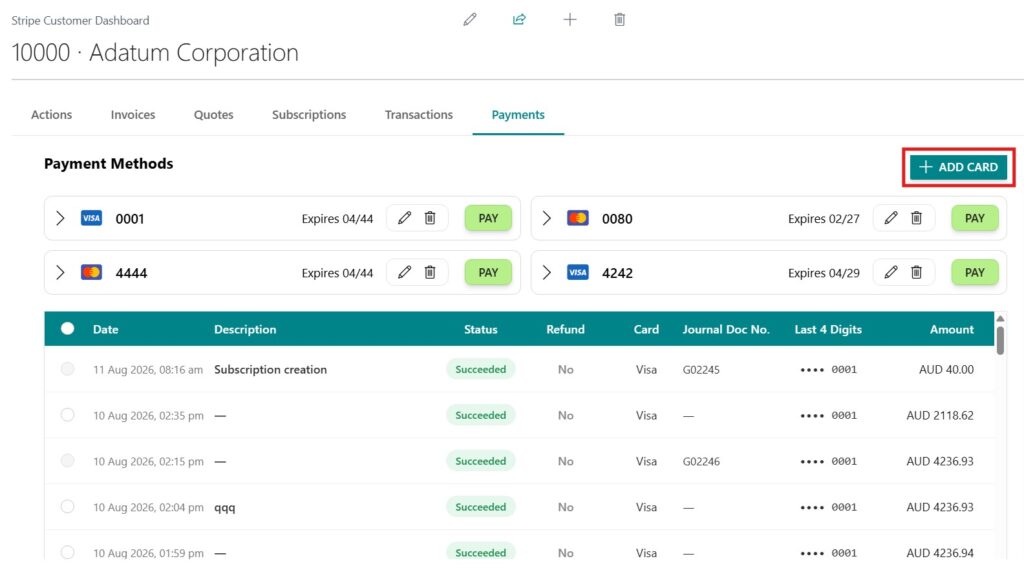
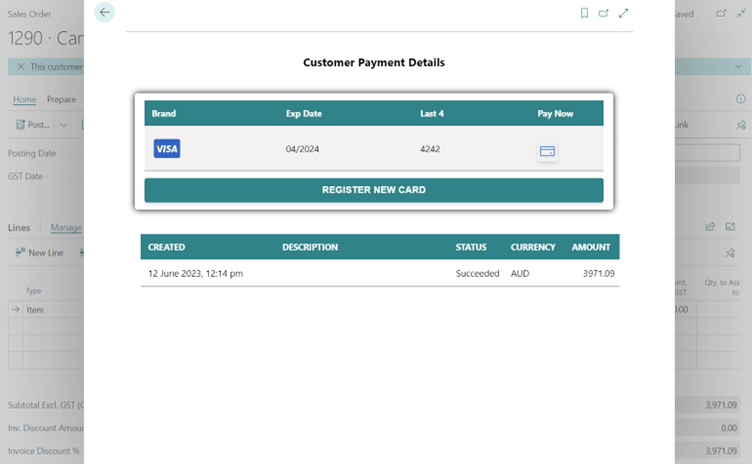
View Saved Cards, add new Card and Pay from Saved Card.
Post single/multiple charges at a time.
View all the posted documents & ledger entries from the Transaction of Stripe role Center.
Create and settle prepayment invoices easily within Microsoft Dynamics 365 Business Central using standard journal workflows.
Handle Stripe fees flexibly by either passing the charges to customers or absorbing them internally based on business preference and pricing strategy.
Directly pay from the customer’s card.
Stripe pays the amount with GST & stripe fees.
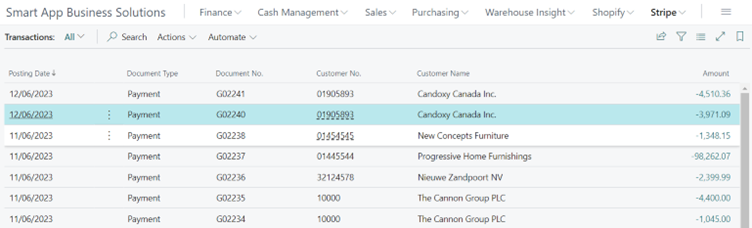
Payment is automatically added to ledger entries.
View all the posted documents & ledger entries from the Transaction of Stripe role Center.
View an attached file with email.
Support multiple currencies for a single stripe account.
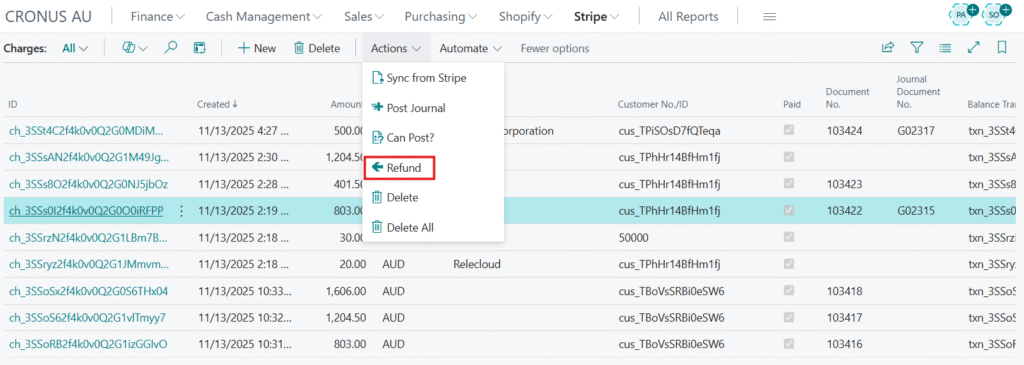
Refund payment.
Schedule Report Run.
View Payment Reports, Payouts, Report Runs, and Charges from Business Central.
Stripe Integration with Business Central Demo
Stripe Payouts in Business Central
Access different Stripe Accounts in Business Central
Our solution works as a complete payment gateway with Business Central, enabling businesses to:
Accept secure online payments
Store customer payment methods safely
Process full or partial payments
Automate financial transactions
Improve customer payment experience
This makes it an ideal solution for organizations looking to modernize their ERP payment capabilities.
Stripe payment from the customer’s card
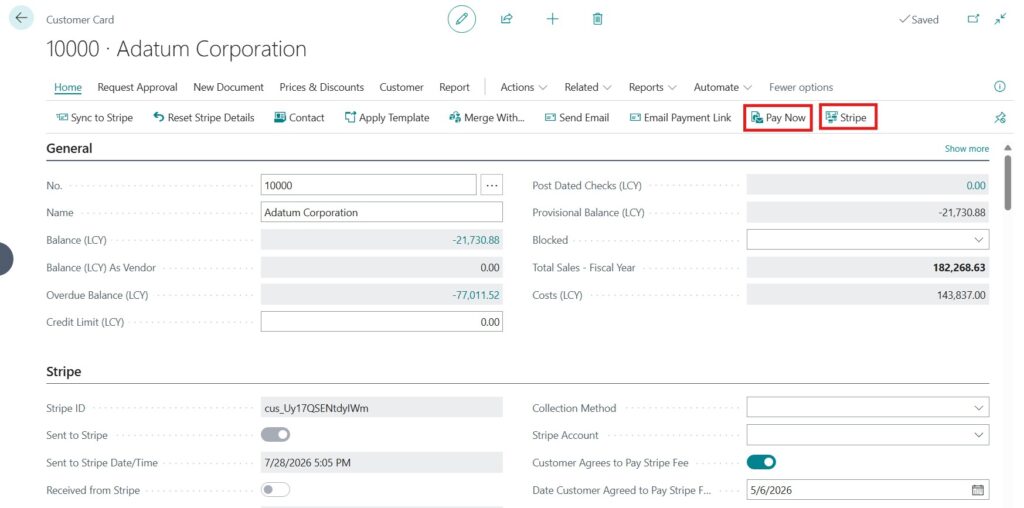
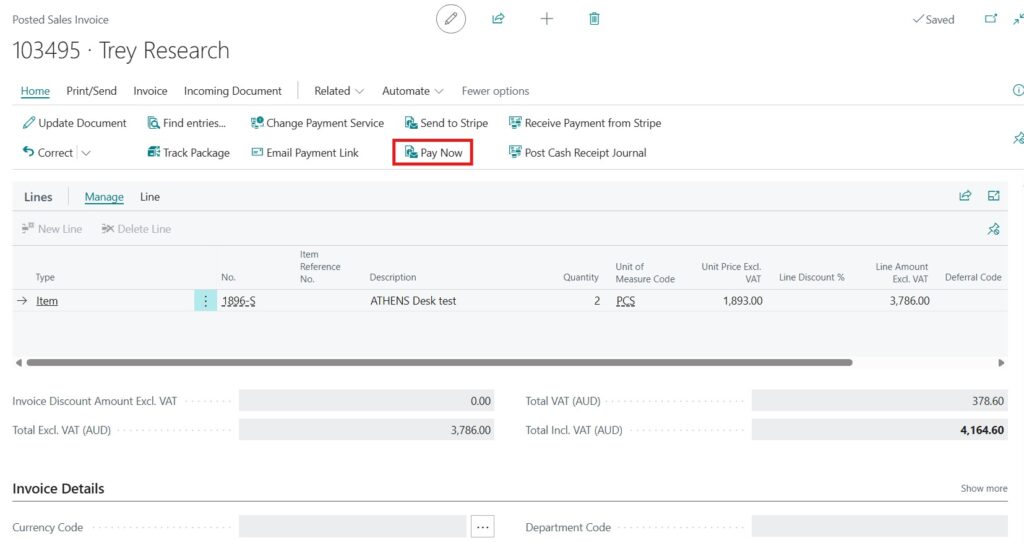
From a customer card, you can make your payment through Stripe with a simple click on “Pay Now”. Alternatively, you can go to the Stripe tab, select “Payments”, and make the payment directly from there.
Stripe Payment from Customer Card
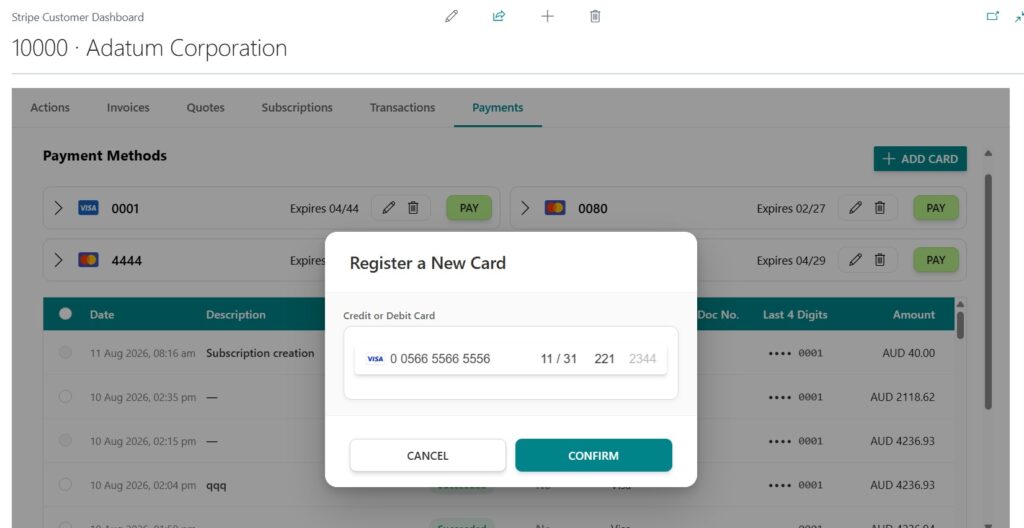
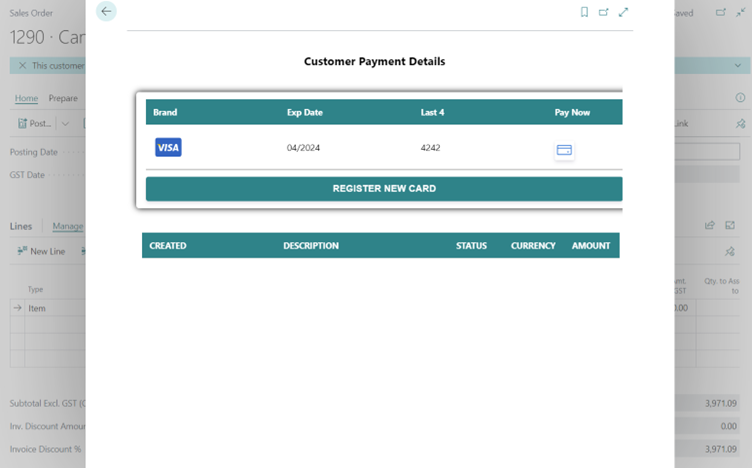
Register your card from here. You can register multiple cards as well.
Put your card information and register it.
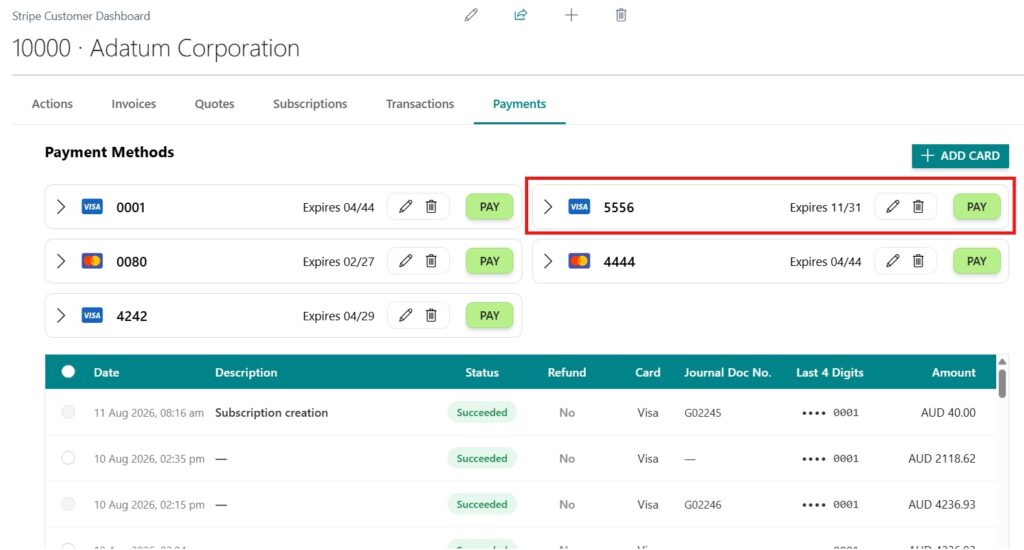
The card is registered, and the information is saved for the customer. Next time the client doesn’t need to give the card information again.
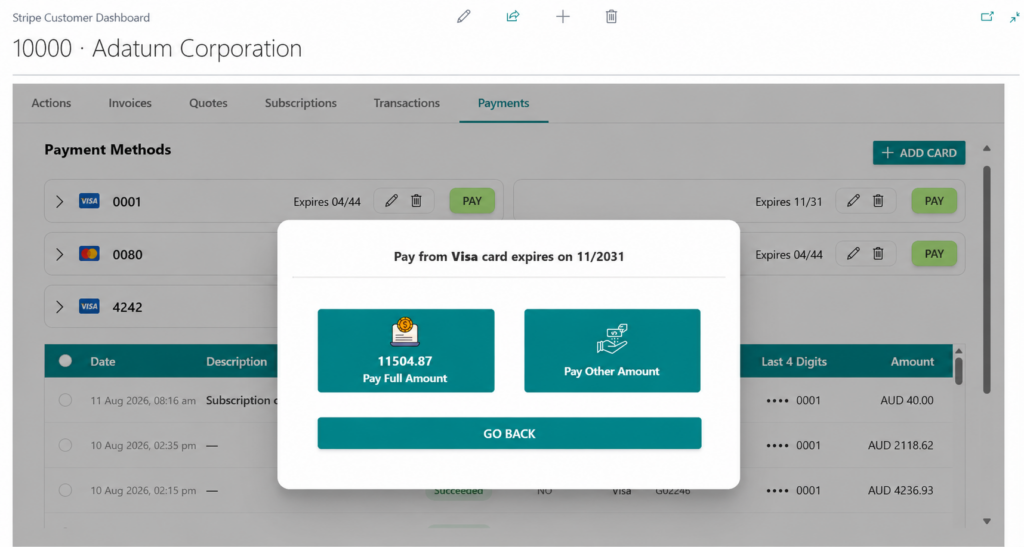
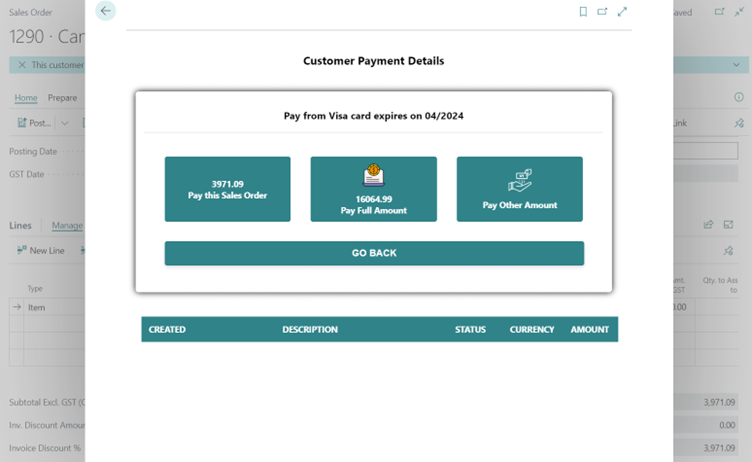
You can pay the full amount due or any partial amount by clicking on Pay Other Amount.
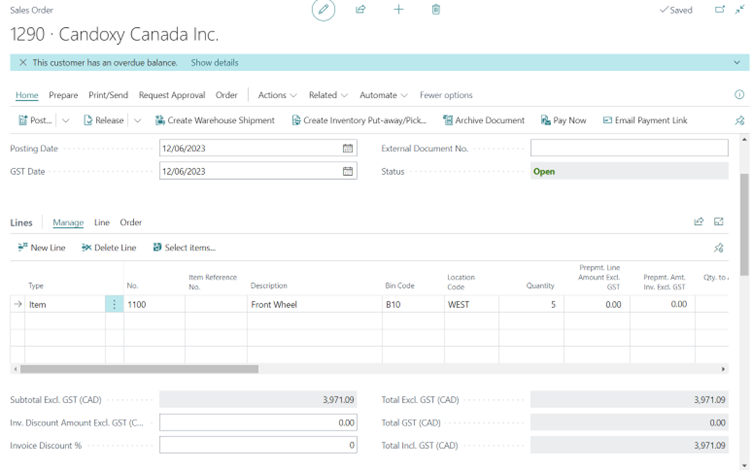
Stripe Payment from sales order
How Stripe Integration Works in Business Central
Sync customers and products between Stripe and Business Central
Generate invoices in Business Central
Send payment links to customers
Customers pay securely via Stripe
Payment is automatically recorded in Business Central
Click on “Pay Now” to make a payment.
Pay Now
Stripe Payment Use Cases
Payments from Customer Card
Customers can securely pay using saved cards directly within Business Central.
Payments from Sales Orders
Easily collect payments from sales orders with a “Pay Now” option.
Email Payment Links
Send invoices with embedded payment links for faster payment collection.
Here you can pay for the sales order, even if you are eligible to pay the full or partial amount.
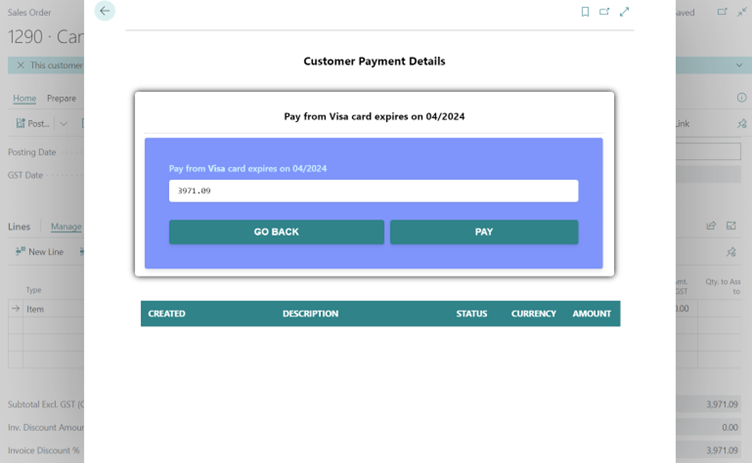
Click on pay to make payment.
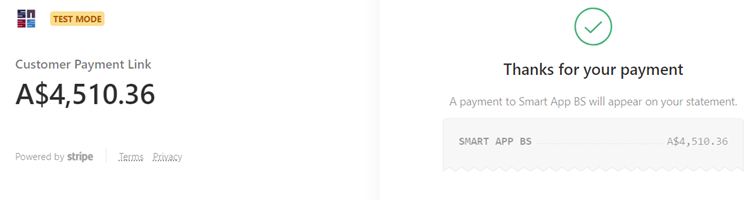
payment is done & the information is shown below.
Benefits of Stripe Integration with Business Central
Faster Payment Collection
Customers can pay instantly using Stripe’s secure payment links and hosted checkout.
Reduced Manual Work
Automate payment posting, reconciliation, and transaction tracking within Business Central.
Seamless Stripe Experience
Leverage Stripe’s powerful payment infrastructure directly inside Business Central without switching systems.
Secure Card & Payment Handling
Stripe ensures secure payment processing with industry-standard compliance.
Payouts
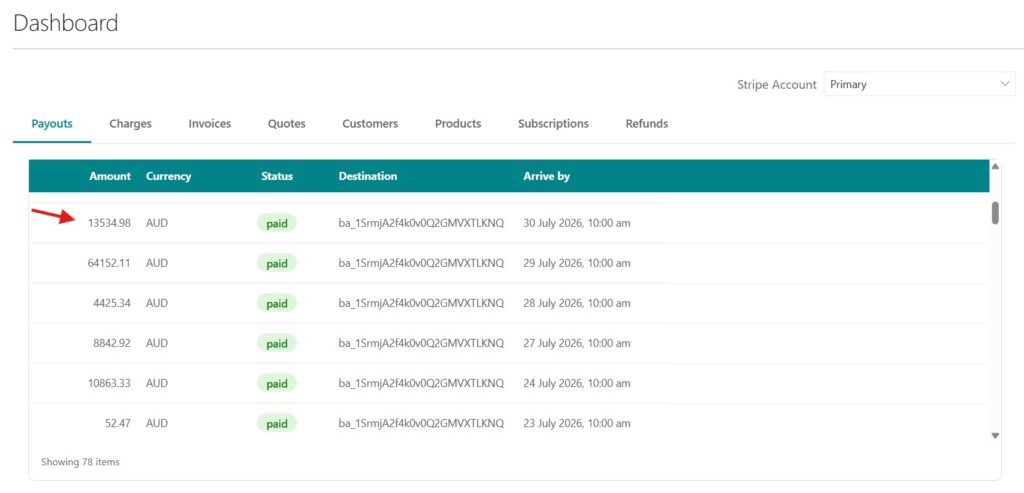
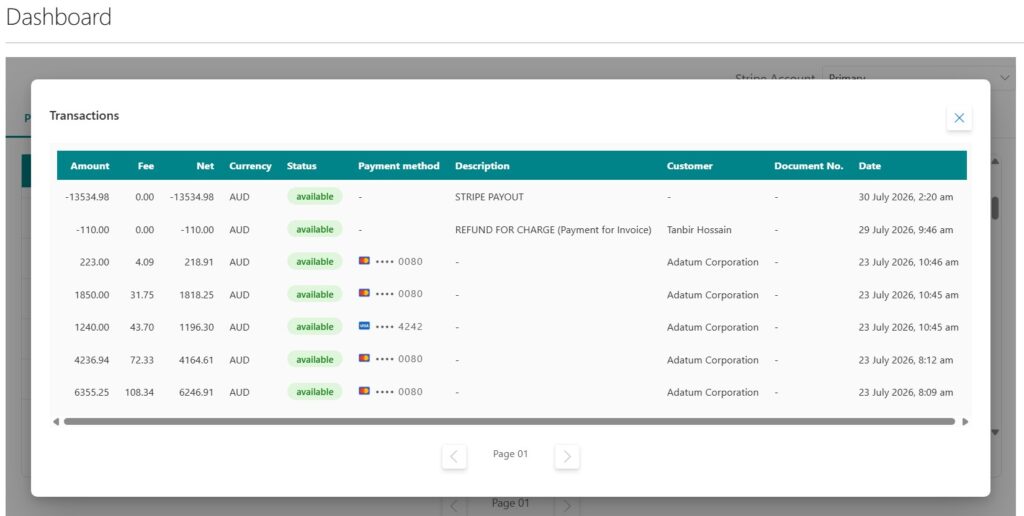
View all Stripe payouts in one centralized view, including payout amounts, status, destination, and expected arrival dates.
Select a payout to view all transactions included in it, along with their payment details, making reconciliation and payout tracking easier.
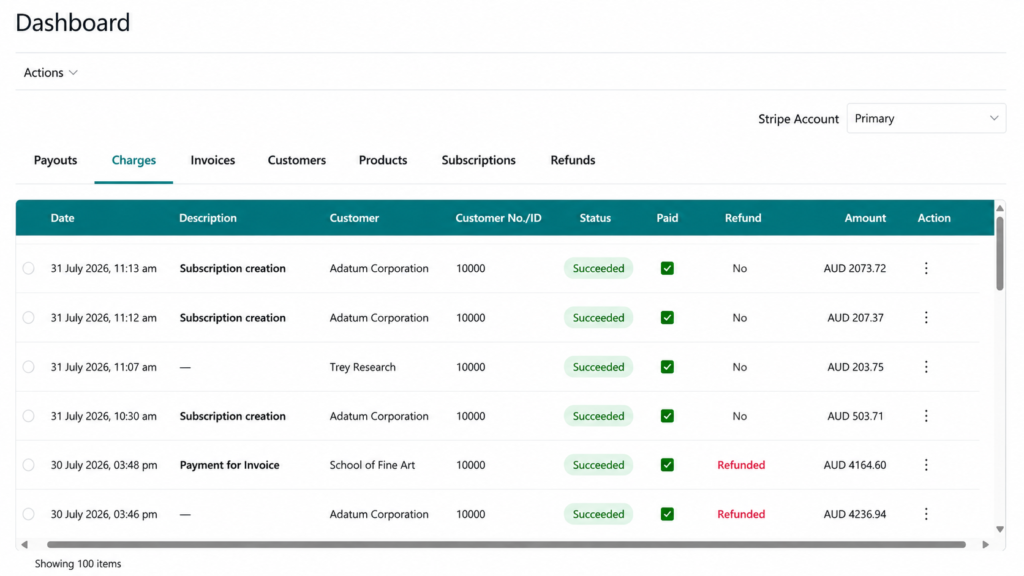
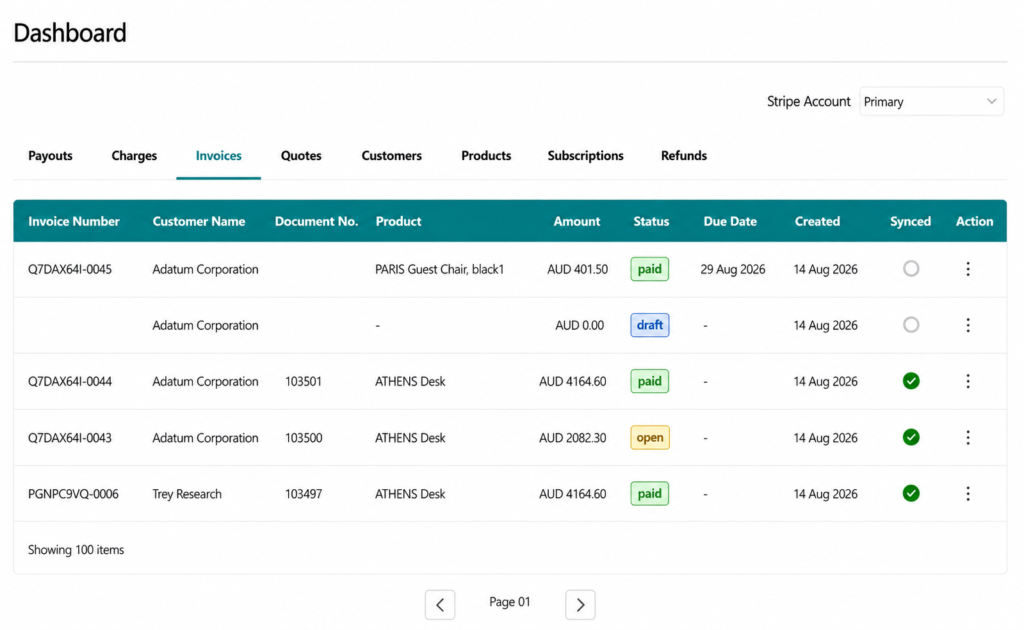
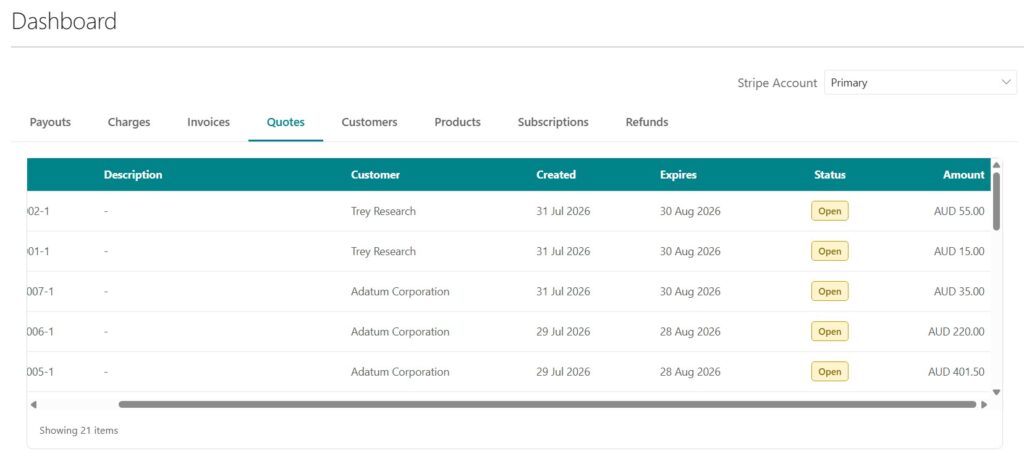
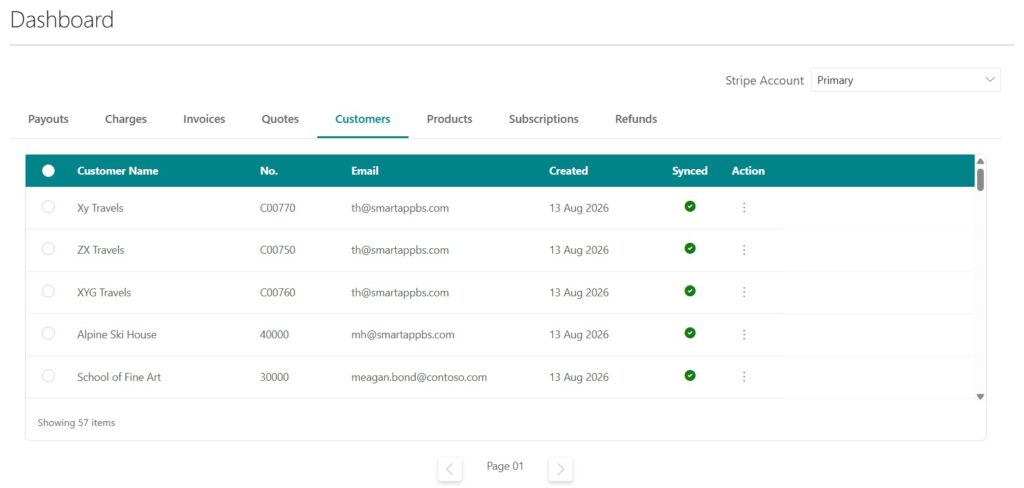
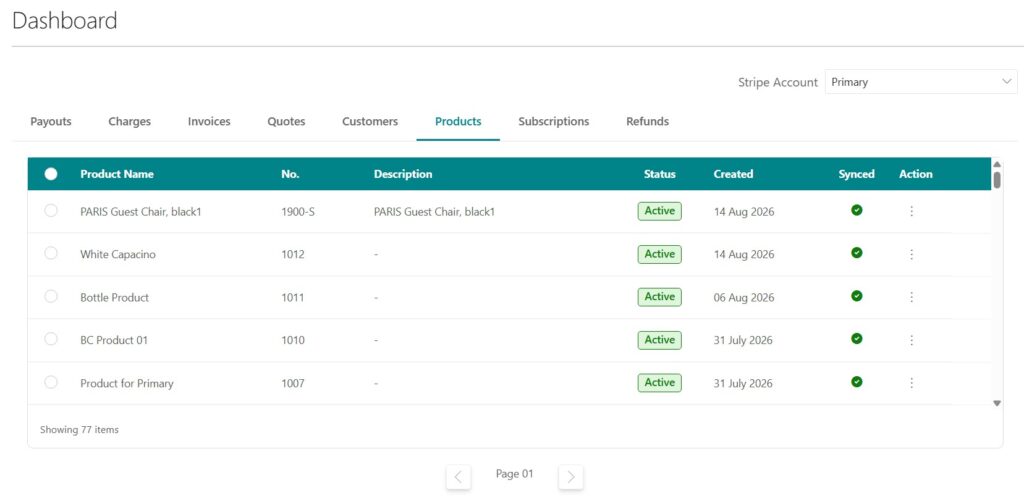
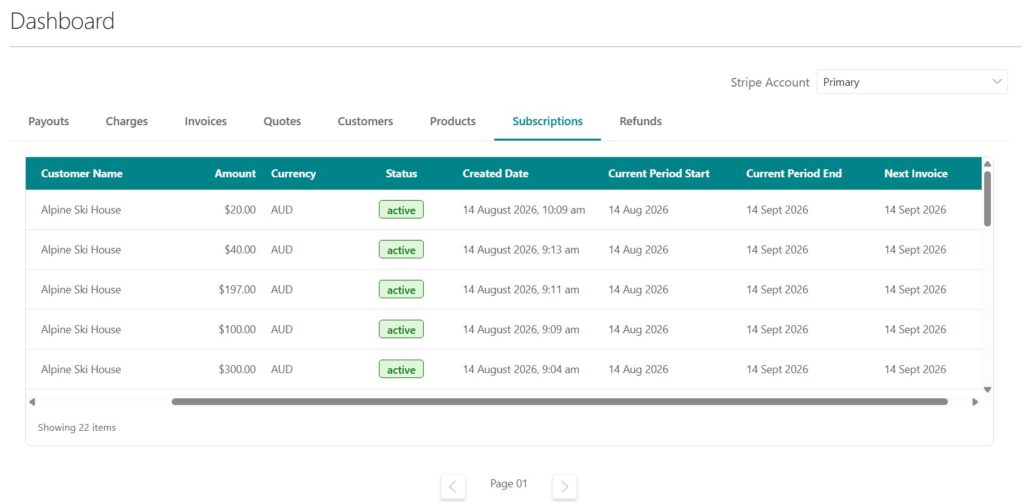
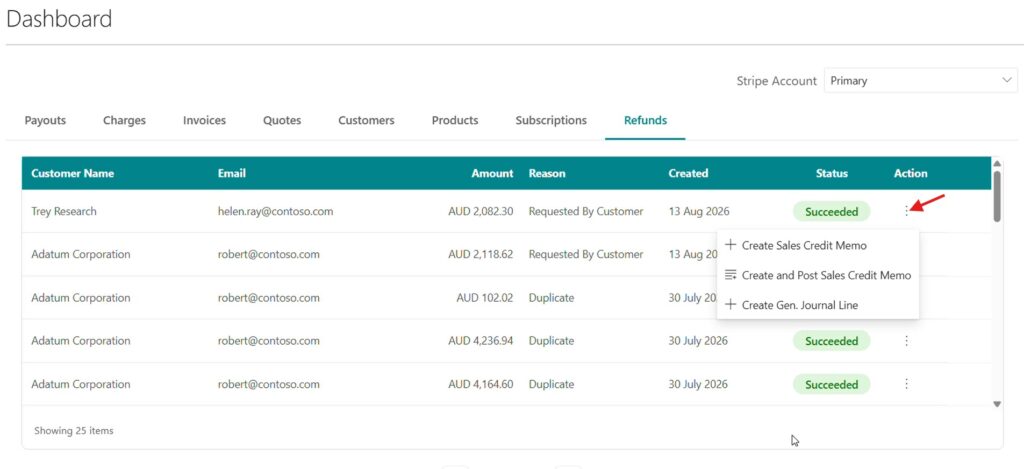
Dashboard
Payouts: Stay on top of every payout, effortlessly. View payout amounts, status, destination, and expected arrival dates in one place, and drill into individual payouts to see the transactions included in them—making reconciliation and cash-flow tracking much easier.
Charges: Get a complete view of your payment activity. Track charges, customers, payment status, amounts, and refunds from a single screen, giving you a clear picture of your incoming payments without switching between systems.
Invoices: Manage your Stripe invoices directly from your Business Central Dashboard. View invoice details, customer information, amounts, due dates, payment status, and sync status at a glance, so you always know what has been paid, what is outstanding, and what is synchronized.
Quotes: Keep every quote within easy reach. View customers, quote amounts, creation and expiry dates, and current status in one centralized view, helping you quickly identify open quotes and stay on top of your sales pipeline.
Customers: Your Stripe customers, all in one place. View customer details, email addresses, customer numbers, creation dates, and synchronization status—and if a customer is not synchronized, sync them directly from the Dashboard to keep your Business Central and Stripe data up to date.
Products: Keep your Stripe product catalogue perfectly aligned. View product names, item numbers, descriptions, status, creation dates, and sync status, with the ability to sync unsynchronized products directly from the Dashboard—eliminating unnecessary manual work.
Subscriptions: Never lose track of recurring revenue. Monitor customers, subscription amounts, currencies, status, billing periods, and upcoming invoices from one place, making it easier to manage active subscriptions and stay prepared for the next billing cycle.
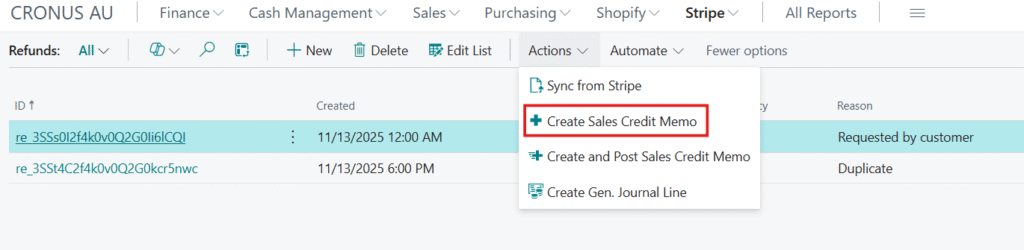
Refunds: Make refund management simple and connected. View refund customers, amounts, reasons, dates, and statuses, then use built-in actions to create or post Sales Credit Memos or create General Journal Lines directly from the Dashboard, reducing manual processing and keeping your financial records in sync.
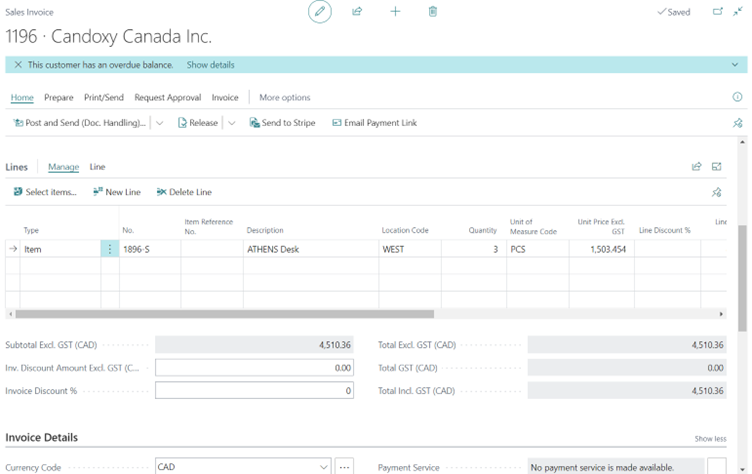
Stripe Payment from Posted Sales Invoice
Email Payment Link
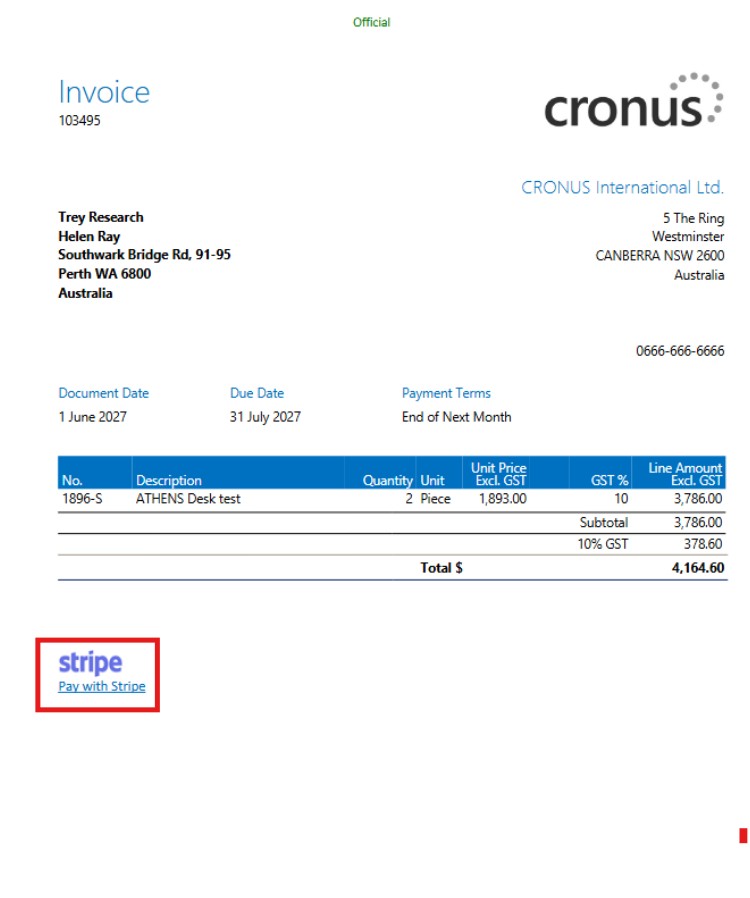
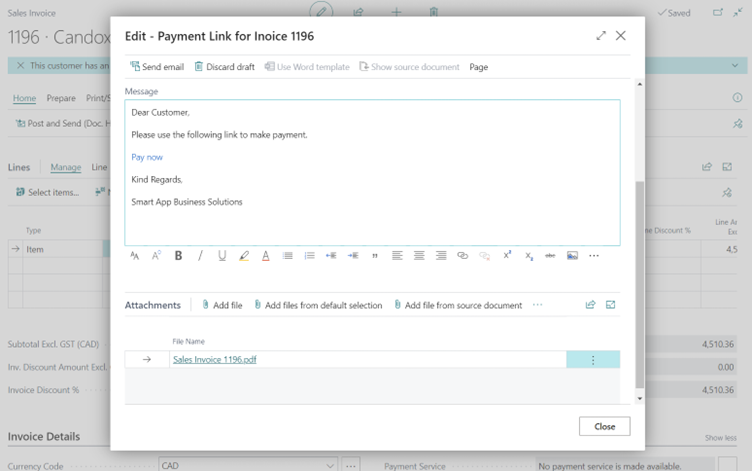
You can mail the payment link to the customer with the invoice.
Here the text is generated automatically with the sales invoice attachment.
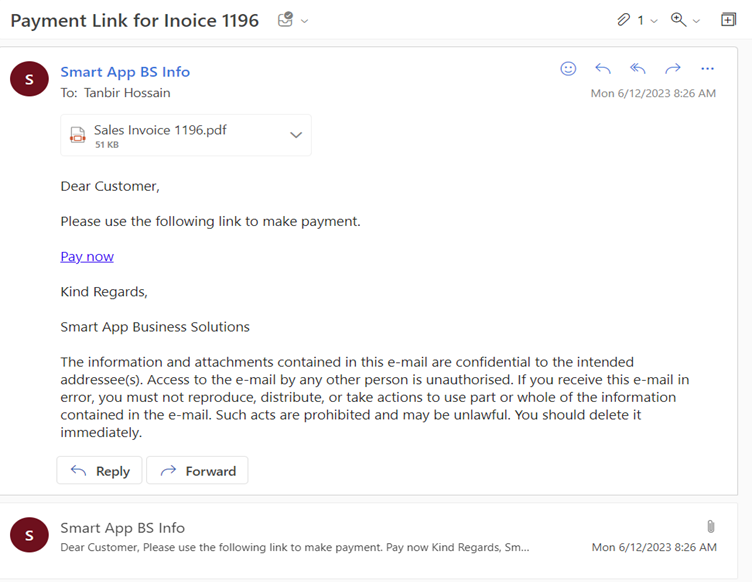
Now the invoice and payment link are there.
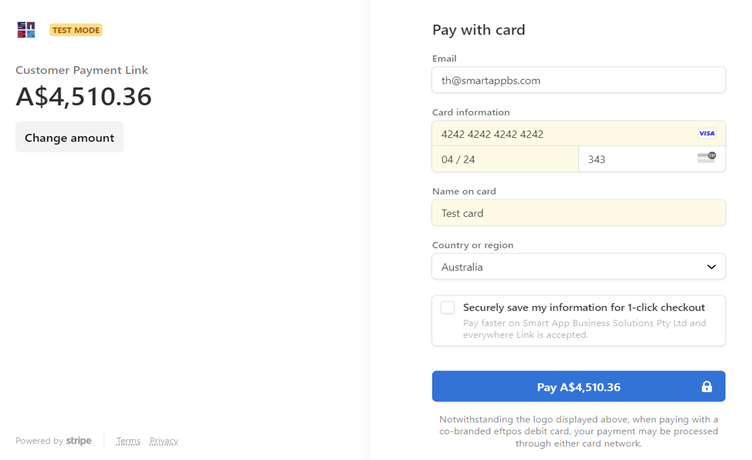
Give your card information, and also can choose the payment amount by yourself.
Payment is done.
Now come to Business Central & see all the transaction details there.
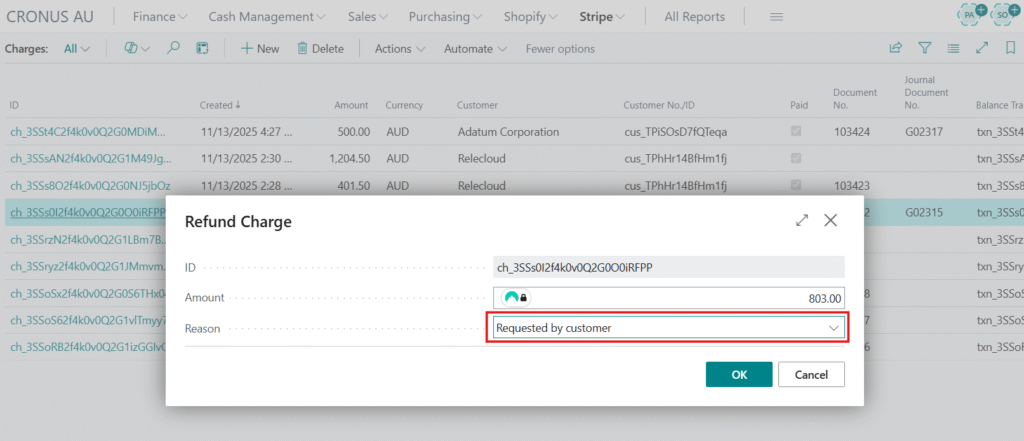
Refunds for Stripe in Business Central
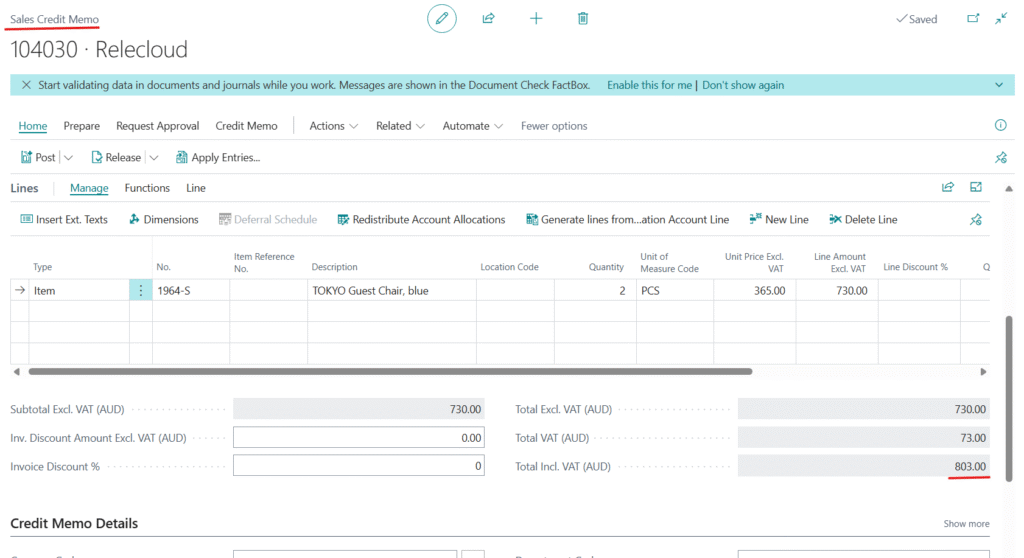
Initiate customer refunds directly in Business Central, with automatic synchronization and creation of a corresponding Sales Credit Memo.
Refunds: Initiate customer refunds directly within Business Central for a seamless and secure reversal process.
Sales Credit Memo: Automatically create a sales credit memo in Business Central upon refund synchronization.
Need Help Integrating Stripe with Microsoft Dynamics 365 Business Central?
Talk to our Business Central integration specialists. We can help you connect Stripe with Business Central, automate payment processing and synchronize financial data. Smart App Business Solutionsis a Microsoft Gold Partner for multiple competencies, Microsoft Dynamics partner and Microsoft reseller. For more information on Dynamics 365 Business Central implementation, customization and third-party Integration, contact us on 1800 72 27 28 | info@smartappbs.com.au
Stripe allows customers to make secure payments through payment links, invoices, or sales orders. Once the payment is completed, the transaction is automatically recorded and posted in Business Central, updating ledger entries in real time.
Stripe integrates with Business Central through a bi-directional synchronization process that connects customers, products, invoices, and payments. This ensures real-time data exchange without requiring any third-party connectors or APIs.