- 1800 72 27 28
- info@smartappbs.com.au
- Suite 20, 27 Hunter Street, Parramatta NSW Australia

ISO 27001 Certified
Customer Portal is a business website that can provide self-service solutions for your customers. It is built on top of Microsoft Power Pages. Power Apps portals and Dynamics 365 portals are now referred to as Power Pages. Power Pages is a secure, enterprise-grade, low-code solution that helps businesses create, host, and administer external-facing business websites. It works across web browsers and devices. Customer Portal uses business data stored in Dataverse to build sites. Being the newest member of Microsoft Power Platform, Power Pages integrates seamlessly with other components that businesses use to build apps, workflows, intelligent virtual agents, and analysis tools.
All businesses that handle customer queries and cases in daily operations. Customer portals can address scenarios like customers inquiring about a product or service. Companies can use it to invite customers to join marketing campaigns or events. Customers can raise complaints against bought products or services. Companies offer post-sales services to customers and manage relevant appointments, etc., on the portal.
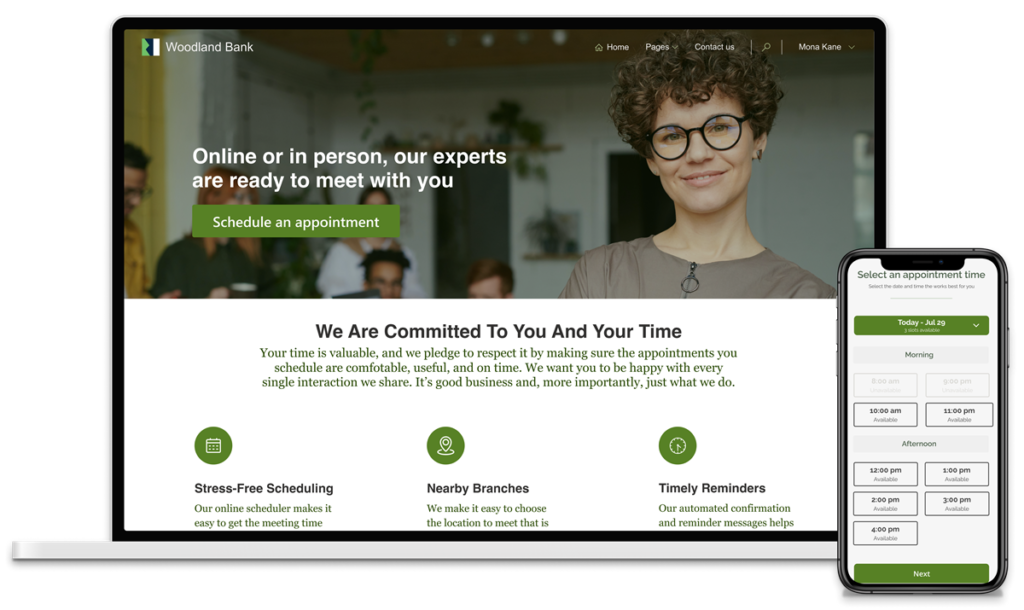
Customer Portal in Dynamics 365 provides users with an online portal forum to communicate, share and collaborate. Similarly, it allows users to get support for issues such as access to the knowledge base. Users can collaborate with communities, and share new ideas.
Its self-service guides customers to the answers they seek without human interference. Customers can check on the status of their orders, view their account details, and communicate via chat or messages.
Furthermore, the portal provides customers with tools to manage their accounts e.g. processing payments, retrieving invoices, etc. This platform makes it easy for customers to access information and perform transactions at their convenience. In addition, it can reduce support costs and improve customer satisfaction.
The Customer Portal in Dynamics 365 offers several features that improve customer engagement. Here is a list of some of the key features of the Customer Portal in Dynamics 365:
Powers Apps Portals offer self-service, reducing the need for customers to contact customer service representatives for simple queries. This results in businesses building better relationships with customers, a better understanding of their needs, and improving customer lifetime value.
Companies can manage customers’ complaints/cases/issues through portals. You can integrate Dynamics 365 Customer Service with the portal to capture cases, store them in the CRM and publish back the solution on the portal.
You can create and manage marketing campaigns allowing customers to register for the campaigns or events and access relevant information.
Share data from Microsoft Dataverse with external users in a secure way so that customers can see only intended data. You can securely collect business data from site visitors and store it in Dataverse.
You can share your data with authenticated users along with anonymous users. Customer Portal in Power Apps supports local sign-in and authentication with Azure Active Directory and Azure Active Directory B2C. It provides authentication with third-party identity providers such as Facebook, LinkedIn, Google, Twitter, Microsoft, etc.
Power Apps Portal offers easy integration with Power BI. You can showcase data visualization directly from Power BI on the portal. With Power BI, visualizing data from Dataverse and displaying them on portals provides your customers with proper insights to make purchase decisions and build long-term loyalty.
Implement critical security capabilities, including advanced encryption and rich role-based access controls. Power Pages support various web application firewalls.
The customer portal can be connected to a variety of data sources, including Common Data Service (now Dataverse), SharePoint lists, and custom APIs. This enables you to share, update, and interact with data from your internal CRM systems.
With standard content management features, you can design your website using drag-and-drop functionality. With Portal’s Design Studio, you can easily build with ready-to-use templates or create customizable experiences. Design your pages with text, video, imagery, and business data forms and lists. You can apply company branding to the website.
With easy integration between SharePoint and Power Pages, you can upload and display documents to and from SharePoint directly on the portal. Customers can upload, download, and delete documents and photos related to their cases on the portal.
Build your website on a standard framework that automatically renders across all devices – desktop or mobile.
You can customize Power Apps Portals to a granular level using a low-code approach. From the portal’s layout, colors, and fonts, to styles, you can apply your company branding.
Customer Portal in Power Apps provides the ability to create workflows and automate business processes using Power Automate, popularly known as Power Flows.
Power Apps Portals, now Power Pages, support multiple languages for you to create portal pages to provide localized experiences for users in different regions.
Power Pages provide developers with the ability to add deeper functionality and capabilities to websites with tools like Visual Studio Code, GitHub, and Azure DevOps.
Overall, the Customer Portal in Dynamics 365 is a comprehensive tool that helps businesses to improve customer satisfaction, reduce customer service costs, and increase customer engagement.
A customer portal in Dynamics 365 brings several benefits to businesses and their customers.
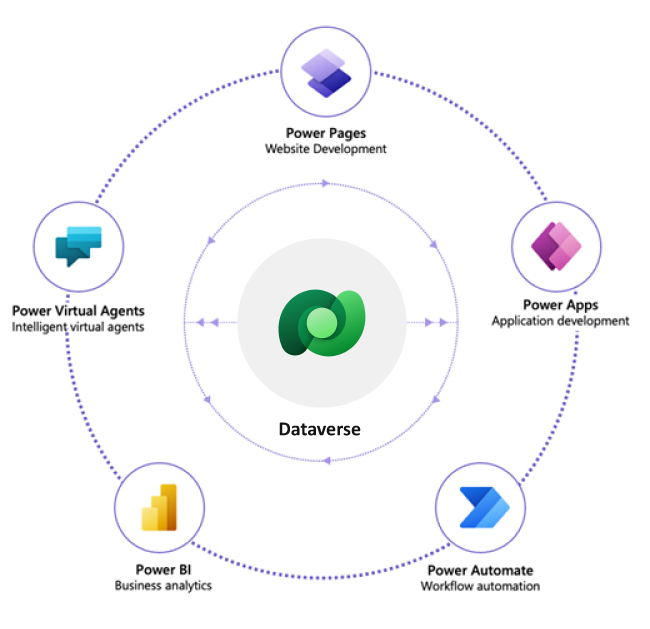
A Dynamics 365 Customer Portal is an ideal way to engage your customers, providing them with 24/7 access to their account details, updated information, and self-service options. It is a user-friendly platform that allows your customers to access a range of documents, such as invoices, reports, and contracts, and update their personal information with ease.
With Dynamics 365 Customer Portal, you can also offer your customers a knowledge base where they can find answers to frequently asked questions, and support resources such as feedback forms and chatbots to make communication with your company simple and quick. By empowering your customers with the tools, they need, you can deliver an outstanding customer experience that will keep them coming back and enhance your brand reputation.
Dynamics 365 Customer Portal is customizable, and you can add features as your business grows and your customers’ needs change. It is a secure, cloud-based solution.
